1 не ми се коси со 2, туку ти немаш ни основни предзнаења па толку можеш да разбереш.


 http://www.overclockers.com/forums/showthread.php?t=696469
Активни само 2 од 6 јадра, ладење two stage phase-change на под -50'C(околу $3000 кошта само ладењето). Golden ES примерок на процесор.
Тоа не е систем со кој можеш нешто да работиш. Освен да го бутираш оперативниот систем и да направиш валидација ништо друго неможеш да направиш со тој систем.
За домашна употреба за 24/7 ти треба конвенционално ладење (воздух или вода) и сетинзи со кои процесорот ќе работи стабилно со сите апликации. Е тука е проблемот со матичната која неможете да ја продадете. Багосано срање е. Има многу багови и неможе да ги менаџира напоните и множителите на јадрата. Згора на тоа недостасуваат најбитното нешто за оверклок експериментирање, а тоа при сетирања за кои системот не се буди немаш можност за брзо враќање на фабрички поставки со само стискање на едно копче. Таква можност имаат сите добри оверклокерски матични плочи од Asus, Gigabyte и некои други, но нема матична од MSI со таква можност...
http://www.xbitlabs.com/articles/mainboards/display/msi-x79a-gd65-8d_6.htmlit couldn’t save BIOS profiles in the even-numbered slots.
We again lost settings written into profiles 2 and 4
When you find out that a profile is lost, it takes a lot of time to recall and reset everything in the numerous BIOS sections.
MSI mainboards do not offer a hot button that would help return to the previous BIOS configuration.
their Active Phase Switching didn’t work in overclocked mode.
APS may get disabled even if the CPU is not overclocked
The CPU multiplier and voltage were not lowered in idle mode. The mainboard used XMP information for our memory modules but increased their voltage to 1.65 volts, which wasn’t necessary. The total power consumption of the system was over 150 watts or twice the normal level in idle mode.
Со други зборови, таа матична плоча е тотална утка и на неа неможеш да сетираш перманенте оверклок за работа 24/7.
Што се однесува до оверклок...
In internal analysis we have found the all CPUs will run the 100 and 125 BCLK / Strap values. When exceeding 125 and attempting 166 BCLK / Strap value we have found considerably less CPUs capable of initializing this value. As such straps of 166 or greater are not recommended.
In addition when attempting to scale BCLK the same limitations are present as previous generation platforms. As such scaling of approx 3 to 5 BCLK is all that is available. ASUS does offer specialized options that can potentially exceed BCLK scaling BCLK Skew. When considering a combination of BCLK with a BCLK/ Strap will still carry the same limited BCLK scaling range.
Due to restrictions with BCLK and BCLK / Strap it is advised that overclocking be achieved through the use of multiplier adjustments only. That being noted ASUS has optimized auto rule parameters to support either configuration mode or both.
http://benchmarkreviews.com/index.php?option=com_content&task=view&id=834&Itemid=38&limit=1&limitstart=2За зборење на памет, целосно е твое задоволство. Кога ќе изоверклокуваш еден систем, ќе имаш шанса да кажеш нешто кое не е на памет. BTW, на Delux-ов вози 220MHz BCLK.
Еве нешто за домашна употреба:

За факти, џабе е кој и да ти збори, не ти оди со прифаќањето...
http://valid.canardpc.com/show_oc.php?id=2244531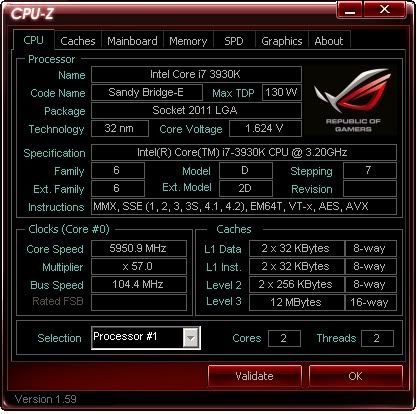
^^